FlutterFlow for MVP Development: Features, Uses, and Benefits
Learn how to use FlutterFlow for MVP Development without extensive coding. Explore its features, costs, use cases, and launch process.

Bharat Purohit
Mobile App & Technology Consultant
In this Article
In this Article
- FlutterFlow for MVP Development: A Practical Guide for Startups
- 2What is MVP Development in FlutterFlow?
- 3Low-Code vs. No-Code: Why FlutterFlow Is Different
- 4Why Startup Founders Choose FlutterFlow for Rapid Prototyping
- 5Limitations of FlutterFlow for MVP Development
- 6Exploring Different MVP Use Cases for FlutterFlow
- 7How to Develop an MVP in FlutterFlow: 5 Steps
- 8FlutterFlow MVP Examples: Real Apps Built with FlutterFlow
- 9Should You Build It Yourself or Hire a FlutterFlow Agency?
- 10FAQs on FlutterFlow for MVP Development
Let's Build the Right Solution, Not Just Software.

Summarize with AI
Short on time? Get the key points instantly with AI.
 ChatGPT
 Perplexity
FlutterFlow for MVP Development: A Practical Guide for Startups
Quick Answer: FlutterFlow is a low-code platform built on Flutter that lets startups build and launch an MVP for Android, iOS, and web in weeks instead of months. It offers a visual builder, pre-built components, Firebase and Supabase integrations, and custom Dart code when needed. It suits MVPs such as marketplaces, booking apps, SaaS dashboards, and internal tools, but is a weaker fit for performance-heavy or highly custom products. Publishing to the app stores and exporting code require a paid plan.
Building a new product from scratch takes time, money, and careful planning. For startups, investing heavily before testing an idea can be risky. That's why many businesses choose to build a Minimum Viable Product (MVP) first.
MVP development in FlutterFlow is a faster way to turn product ideas into working applications. Its visual development tools help teams build core features without writing extensive code. If you develop an MVP in FlutterFlow, you can test ideas and collect feedback from early users sooner.
But is FlutterFlow right for every MVP? In this guide, we cover its benefits, limitations, costs, a five-step development process, real examples, and when to hire an agency.
What is MVP Development in FlutterFlow?
MVP development means building a basic version of an app with only its essential features. The goal is to test a product idea, understand user needs, and validate market demand before investing in full-scale development.
FlutterFlow is a low-code development platform built on Google's Flutter framework. It uses a visual, drag-and-drop interface that lets developers design and build mobile and web applications with less manual coding. It also supports custom Dart code, giving developers more control over app features and functionality.
With FlutterFlow, startups can build an MVP, test it with early users, and improve it based on feedback. It also integrates with backend services like Firebase and Supabase for authentication, databases, and data storage.
Low-Code vs. No-Code: Why FlutterFlow Is Different
No-code platforms let users build applications mainly through visual tools, without writing code. Low-code platforms offer similar visual tools but also allow developers to add custom code when needed.
FlutterFlow follows a low-code approach. Its drag-and-drop builder, pre-built components, and visual logic tools make app development easier. However, developers can also write custom Dart code, create custom functions, and extend app functionality beyond built-in features.
This makes FlutterFlow useful for both simple MVPs and applications with more specific requirements. Startups can begin with visual development tools and introduce custom code as their product needs grow. It offers a balance between faster development and greater control over the final application.
Why Startup Founders Choose FlutterFlow for Rapid Prototyping
Startup founders need to test ideas quickly without spending their entire budget on product development. FlutterFlow helps them build functional prototypes and MVPs with less manual coding and faster development cycles.
Its visual builder, ready-made components, and backend integrations make it easier to turn product ideas into working applications. Here are some key reasons why startups consider FlutterFlow for rapid prototyping and MVP development.
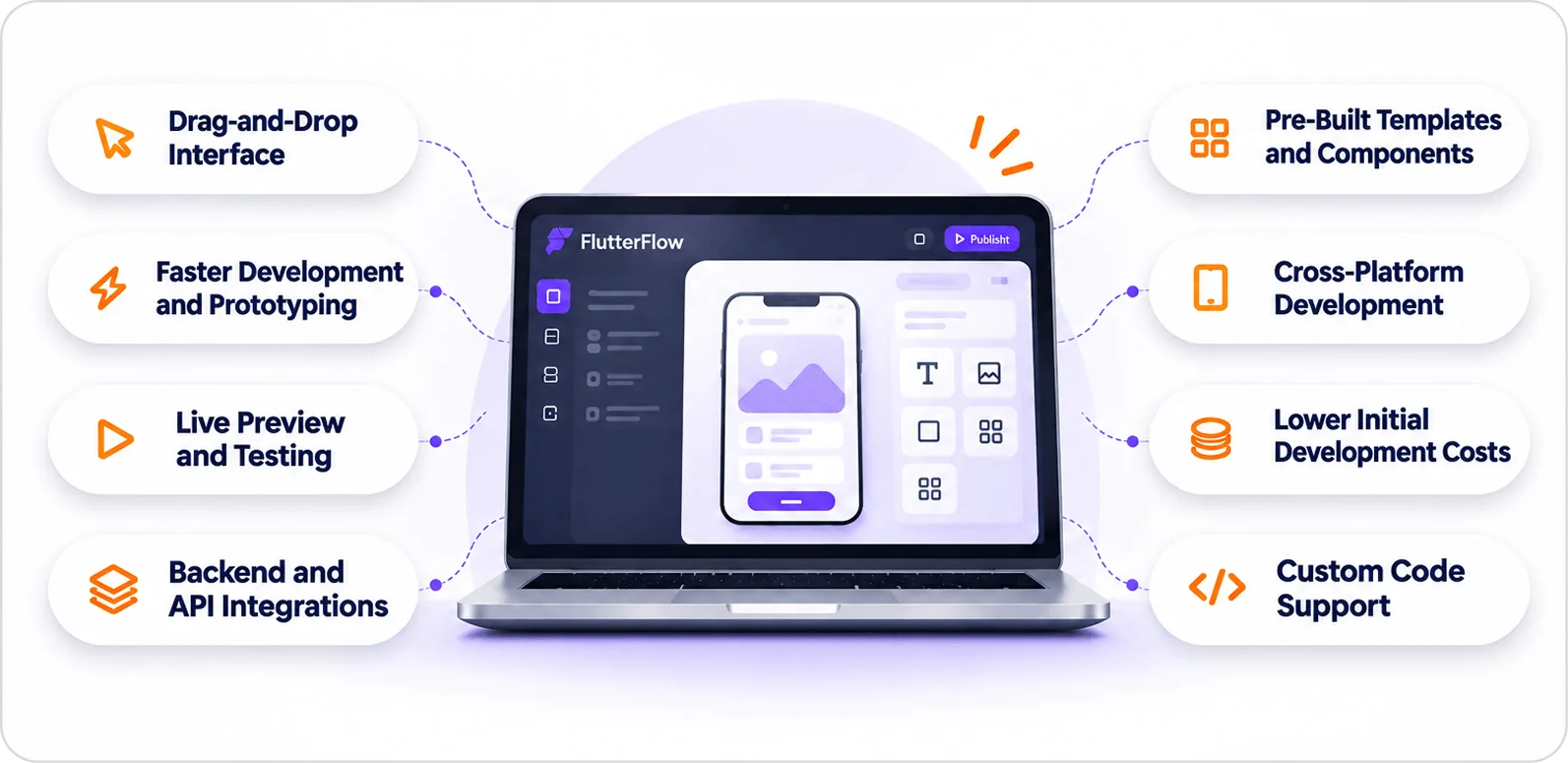
Drag-and-Drop Interface
FlutterFlow offers a visual editor where developers can build app screens by dragging and arranging ready-made elements. These include buttons, text fields, images, forms, and navigation menus.
This reduces the need to write code for every interface element. It also makes it easier to test different layouts and user flows before finalizing the app design.
Faster Development and Prototyping
Building an MVP with traditional development methods can take considerable time. FlutterFlow speeds up the process with its visual builder, reusable components, and ready-made templates.
Developers can create screens, connect actions, and test basic app functionality without writing everything from scratch. This helps startups launch prototypes sooner, collect feedback, and make changes before moving toward a full product.
Live Preview and Testing
FlutterFlow's visual builder lets developers see interface changes as they work. They can adjust layouts, update components, and test different screen designs without repeatedly writing and running code.
This makes prototyping more practical. Founders and product teams can also review the app's appearance early and share feedback before development moves further.
Backend and API Integrations
An MVP needs more than a good-looking interface. It may also require user accounts, data storage, payment processing, and connections with external services.
FlutterFlow supports integrations with several backend platforms and third-party APIs.
Firebase: Supports authentication, real-time databases, cloud storage, analytics, and cloud functions.
Supabase: Offers PostgreSQL databases, authentication, and APIs for applications that need more database flexibility.
Third-party APIs: Connect your MVP with payment gateways, maps, location services, and other external systems.
These integrations help developers add essential backend features without building every service from scratch. Note that some MVP features depend on your plan: the Free plan does not include payments, push notifications, or third-party package imports, so most real MVPs need a paid plan.
Pre-Built Templates and Components
FlutterFlow provides ready-made templates and reusable components that help developers get started faster. These include login screens, dashboards, forms, navigation menus, and other common app elements.
Developers can customize these components to match the product's design and requirements. This reduces repetitive work and leaves more time for building features that make the MVP useful.
Cross-Platform Development
FlutterFlow uses Flutter to support app development for multiple platforms. Developers can build applications for Android and iOS while sharing much of the same codebase.
This means startups don't need to build two completely separate applications for their initial launch. They can test their product with users across both platforms while reducing development effort.
Lower Initial Development Costs
Building an MVP requires careful spending, especially when a startup has limited resources. FlutterFlow can lower initial development costs by reducing repetitive coding and shortening build time. Paid plans start at $39/month on monthly billing, and you still pay for backend usage and app store accounts.
Its pre-built components and visual tools also reduce the time needed for common development tasks. For a full picture of typical project budgets, see our guide to Flutter App Development Cost. However, complex features, custom backend logic, testing, and ongoing maintenance may still require experienced developers.
Custom Code Support
Low-code doesn’t have to mean limited customization, though custom Dart code does require developer skills. FlutterFlow supports custom Dart code, allowing developers to add features that go beyond its built-in components and actions.
This is useful when an MVP needs specific business logic, custom interactions, or integrations that visual tools alone cannot handle. Startups with more demanding requirements can Hire Flutter Developers to implement custom features while retaining FlutterFlow’s rapid development approach. It also gives development teams more flexibility as product requirements become clearer.
Limitations of FlutterFlow for MVP Development
FlutterFlow is a strong MVP tool, but know its trade-offs before committing.
Plan-dependent features: Payments, push notifications, package imports, and store publishing need a paid plan, so the “free” route is mainly for prototyping.
Platform dependency: FlutterFlow restructured its plans in 2025 and retired the older ones, a reminder that pricing and features are controlled by the vendor.
Complex logic still needs code: Offline sync with conflict handling, heavy backend logic, and performance-intensive features usually need custom Dart or a custom backend.
Exported code needs review: You can download your Flutter source code on paid plans, but plan time for developers to review and clean it before extending it outside FlutterFlow.
Not ideal for: real-time multiplayer games, video-heavy apps, and products needing deep native integration.
Exploring Different MVP Use Cases for FlutterFlow
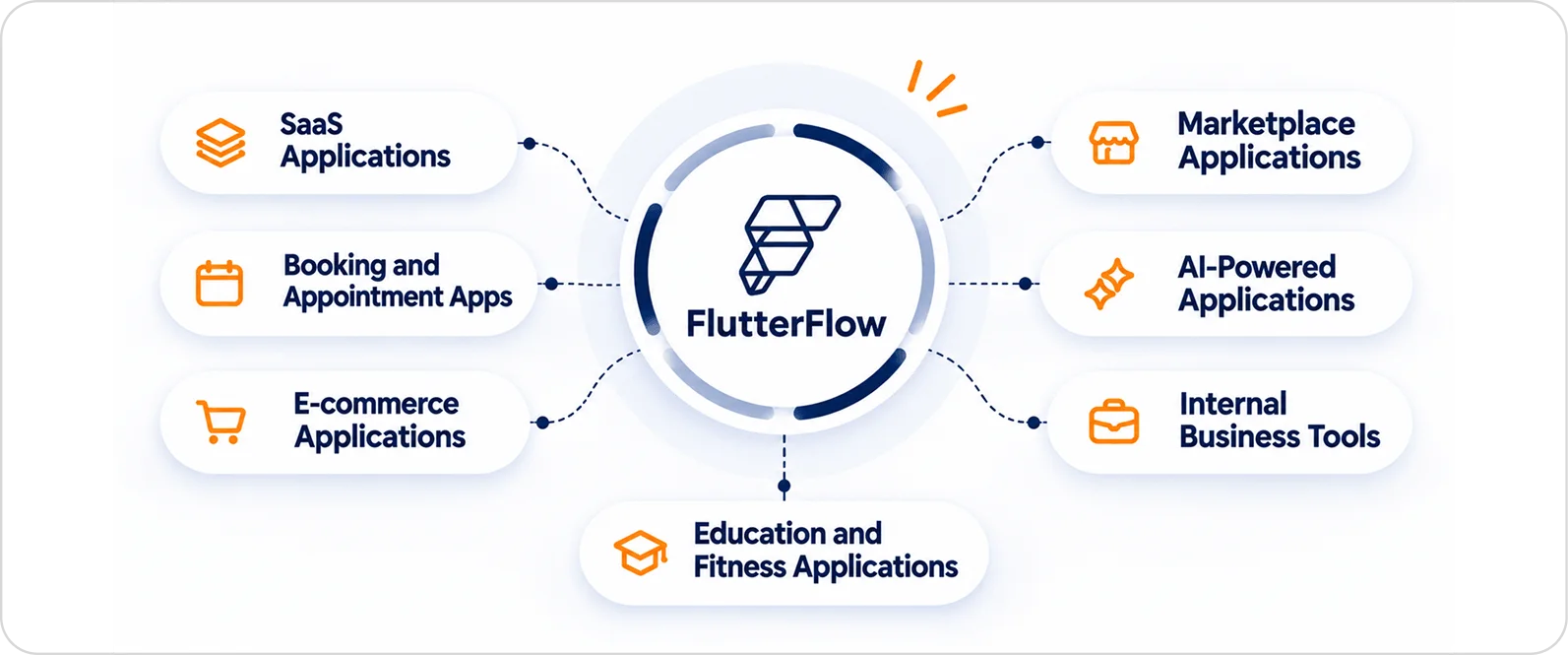
FlutterFlow supports different types of MVPs across industries and business models. It works particularly well for products that need visual interfaces, backend integrations, and room for changes based on user feedback.
Here are some common application types you can build with FlutterFlow:
SaaS Applications: Build customer portals, reporting dashboards, subscription-based products, and workflow management tools.
Marketplace Applications: Create platforms that connect buyers and sellers, customers and service providers, or businesses and independent professionals.
Booking and Appointment Apps: Develop applications with scheduling, availability management, payment processing, reminders, and user profiles.
AI-Powered Applications: Build AI assistants, recommendation tools, and content applications by connecting external AI services through APIs.
E-commerce Applications: Create product catalogs, customer accounts, shopping experiences, and basic order management systems.
Internal Business Tools: Develop employee portals, field service applications, operational dashboards, and tools for managing internal workflows.
Education and Fitness Applications: Build learning platforms, fitness tracking apps, personalized training programs, and subscription-based services.
However, not every application has the same development requirements. A basic booking app may need only a few screens and backend connections, while a multi-vendor marketplace requires more complex workflows and integrations.
FlutterFlow is a weaker fit for real-time multiplayer games, video-heavy apps, products with complex offline sync, or apps with heavy on-device processing. For these, custom Flutter or native development is often a better starting point. If your idea fits the use cases above, the next step is to plan the development process.

Building Your MVP with FlutterFlow?
Get expert guidance on FlutterFlow's capabilities, limitations, development costs, and scalability. We'll help you evaluate the right approach to turn your MVP idea into a functional, launch-ready product.
How to Develop an MVP in FlutterFlow: 5 Steps
Building an MVP in FlutterFlow starts with a clear product idea and a focused development plan. You don’t need to build every feature at once. Instead, focus on the core functionality that helps users solve a specific problem.
Here are five steps to develop an MVP using FlutterFlow.
Step 1: Define Your MVP Scope and Core Features
Start by identifying the problem your product aims to solve. Think about your target users, their needs, and the value your app will offer.
Next, list the features required to deliver that value. Keep the list short and focus on essential functionality.
For example, if you’re building a task management app, your initial feature list might include:
User registration and login
Creating and editing tasks
Setting task deadlines
Viewing pending and completed tasks
Avoid adding advanced features at this stage. A focused feature list helps control development time and keeps your MVP easy to test.
Step 2: Create Wireframes and Design Your App
Once you have defined the scope, plan how users will interact with your app. Start with simple wireframes that show the layout of each screen and how users will move between them.
Next, open FlutterFlow and use its visual builder to design your app. You can also explore FlutterFlow AI to learn about its AI-assisted features and how they fit into the app development process. You can start with a pre-built template or create screens from scratch using its drag-and-drop components.
Customize elements such as buttons, images, text fields, colors, and navigation menus to match your product requirements. Also, map out the user journey to make sure each screen serves a clear purpose.
Step 3: Build Core Features and Connect the Backend
With the design in place, start adding the features that make your MVP functional. Use FlutterFlow’s built-in actions and logic builder to define how different components behave.
For example, in a task management app, you can connect the Add Task button to a form and save the submitted information to a database.
You can also connect your project with backend platforms such as Firebase or Supabase to manage:
User authentication and account management
Database operations and data storage
Real-time data updates
File and image storage
If your app requires specific business logic or functionality beyond built-in tools, developers can also add custom Dart code.
Step 4: Test Your MVP and Improve It
Before launching, test your MVP to make sure its core features work as expected. On the Free plan, Test Mode sessions expire after 20 minutes, so longer testing sessions are easier on a paid plan.
Pay attention to common issues, such as broken navigation, login errors, incorrect data, and slow responses. Test the app across different screen sizes and devices to identify usability problems.
Once the basic issues are resolved, share the MVP with a small group of target users. Ask them to complete common tasks and share their feedback. Use their input to fix problems and improve the overall experience.
Step 5: Deploy Your MVP and Track User Feedback
After testing, prepare your MVP for launch. FlutterFlow supports deployment for Android, iOS, and web applications, depending on your project requirements.
You can publish your mobile app through the app stores or deploy a web app using supported hosting. Store publishing needs a paid FlutterFlow plan plus your own Apple Developer ($99/year) and Google Play ($25 one-time) accounts.
However, launching your MVP is not the final step. Track how users interact with the app, which features they use, and where they face difficulties. Collect feedback and review basic usage data to understand what needs improvement.
Use these findings to prioritize updates and decide which features deserve attention in the next development cycle. This helps you improve the product based on actual user needs rather than assumptions.
FlutterFlow MVP Examples: Real Apps Built with FlutterFlow
FlutterFlow is not limited to prototypes or simple applications. Several startups have used the platform to build functional products, launch them across platforms, and serve real users.
These examples show how FlutterFlow can support different business ideas, from healthcare and fitness to social networking and field operations.
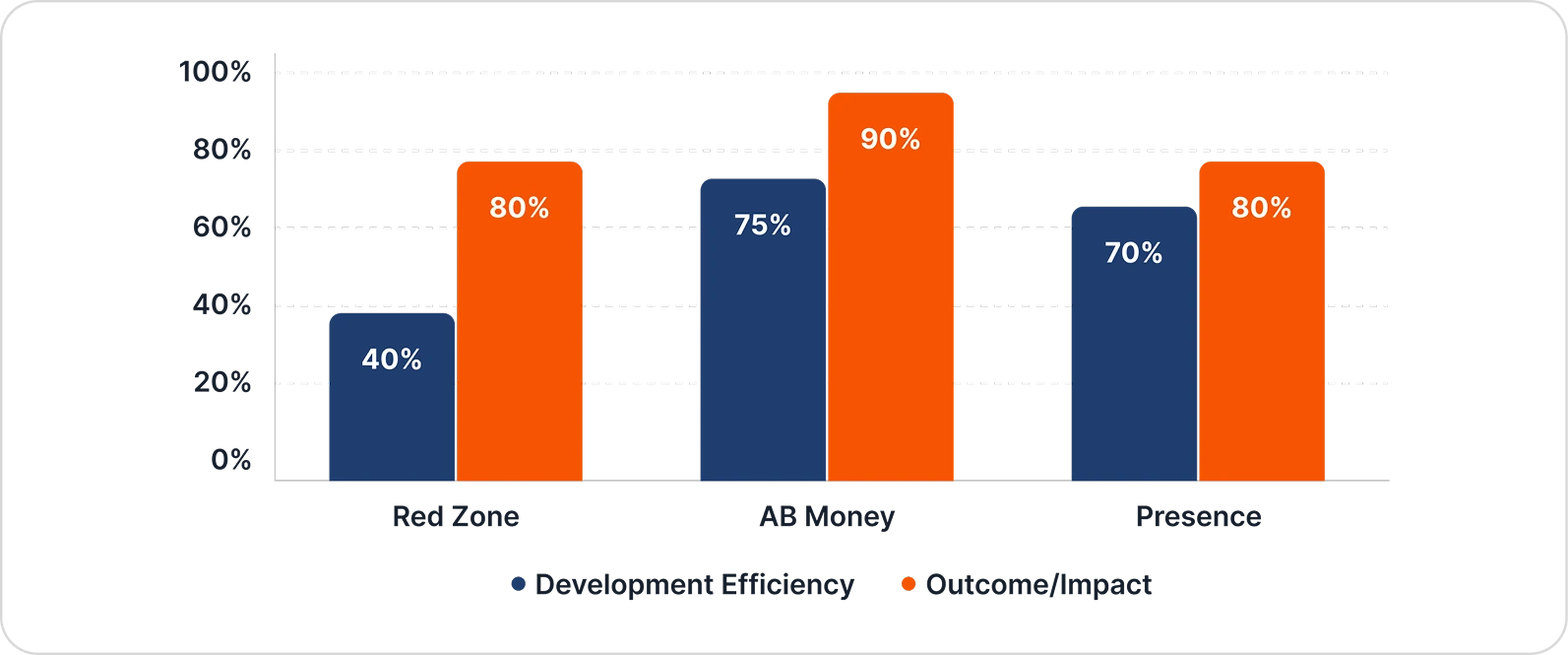
RedZone
RedZone developed an application to simplify sewer inspections and replace an outdated paper-based workflow. Its previous process made it difficult for field workers to manage inspections, especially in remote locations.
Using FlutterFlow, the company built an MVP with offline functionality. This allowed workers to access and update inspection records without depending on a constant internet connection. According to the published case study, the app reduced the time to log work orders by 40% and improved data accuracy by 80%.
AB.Money
AB.Money is a meditation and mental wellness application that offers guided sessions and mindset-building content. The platform started with an MVP built using FlutterFlow and later expanded into a full-fledged application.
FlutterFlow's cross-platform capabilities helped the team launch the app on both iOS and Android. The application offers meditation sessions led by Sasha Belaire and has gained recognition among users in Eastern Europe.
Presence
Presence is a social networking application designed to help people discover others nearby who share similar interests. It started as an MVP built with FlutterFlow and focused on making local connections easier.
The application combines features such as geolocation, chat, and AI-driven matching. Integrations with Firebase and external APIs helped support these functions. Its initial launch across web and mobile platforms helped introduce the product to a wider audience.
FlutterFlow can support MVPs across different industries and use cases. However, the right development approach still depends on your product’s complexity, backend requirements, performance needs, and long-term plans.
Should You Build It Yourself or Hire a FlutterFlow Agency?
At NebulaTech, we use FlutterFlow AI selectively to speed up specific parts of app development. We focus on where it saves meaningful effort while keeping technical control over the final product.
This is where an experienced development team can help. NebulaTech offers Flutter App Development Services to help startups plan, build, and launch MVPs around their business requirements. Our consulting-first approach focuses on choosing the right technology, defining essential features, and building a product with future growth in mind.
FAQs on FlutterFlow for MVP Development
A very simple, single-flow MVP can take 2–6 weeks with an experienced team, while a typical MVP with integrations often takes 2–4 months. More complex applications with custom features, multiple integrations, or advanced backend requirements may take several months. The timeline depends on your feature list, design requirements, testing process, and development experience.