FlutterFlow AI: Features, Limitations & What You Can Build
Explore FlutterFlow AI features, what you can build with it, its limitations, and how to decide if it’s right for your app development project.

Bharat Purohit
Mobile App & Technology Consultant
In this Article
In this Article
- What is FlutterFlow AI?
- 2FlutterFlow AI Features: The Main AI Capabilities
- 3What Can You Build With FlutterFlow AI?
- 4FlutterFlow AI Limitations You Should Know Before Starting
- 5FlutterFlow AI vs Custom Flutter Development: Which Should You Choose?
- 6How NebulaTech Approaches FlutterFlow AI Projects
- 7Conclusion
- 8FAQs on FlutterFlow AI
Let's Build the Right Solution, Not Just Software.

Summarize with AI
Short on time? Get the key points instantly with AI.
 ChatGPT
 Perplexity
FlutterFlow AI: Features, Limitations, and What You Can Build
Quick Answer: FlutterFlow AI can help you generate and refine app UI and integrate AI-powered functionality, but it isn't a replacement. It works best when teams use it to accelerate the right parts of development while developers retain control over architecture, backend systems, security, performance, integrations, and production readiness.
FlutterFlow AI is a collection of AI-powered tools within FlutterFlow that helps users generate app designs, pages, components, and AI-powered experiences using natural language and other inputs. It can speed up prototyping and reduce repetitive development work, while the visual environment lets you refine the output.
At NebulaTech, we look at FlutterFlow AI as more than an AI app builder. We assess where it can genuinely reduce development effort and where generated output may create technical risks. This helps us understand its practical value for real-world projects.
In this guide, we'll explore how FlutterFlow AI works, its key features, use cases, limitations, pricing considerations, and when it makes sense for a production project.
What is FlutterFlow AI?
FlutterFlow AI is a set of AI-powered features built into FlutterFlow that helps developers and non-developers create app screens, components, and other UI elements with less manual effort. You can describe what you need in natural language, and the AI generates a starting point that you can refine.
FlutterFlow itself is a visual app development platform built on Google's Flutter framework. Its drag-and-drop environment lets you design interfaces, connect data, add app logic, and build for platforms such as iOS, Android, and web.
The key difference is that FlutterFlow AI adds AI-assisted creation to this visual workflow. Instead of starting every screen from scratch, you can generate an initial version and then customize its design, connect APIs and backends, add business logic, or extend it with custom code when required.
FlutterFlow AI Features: The Main AI Capabilities
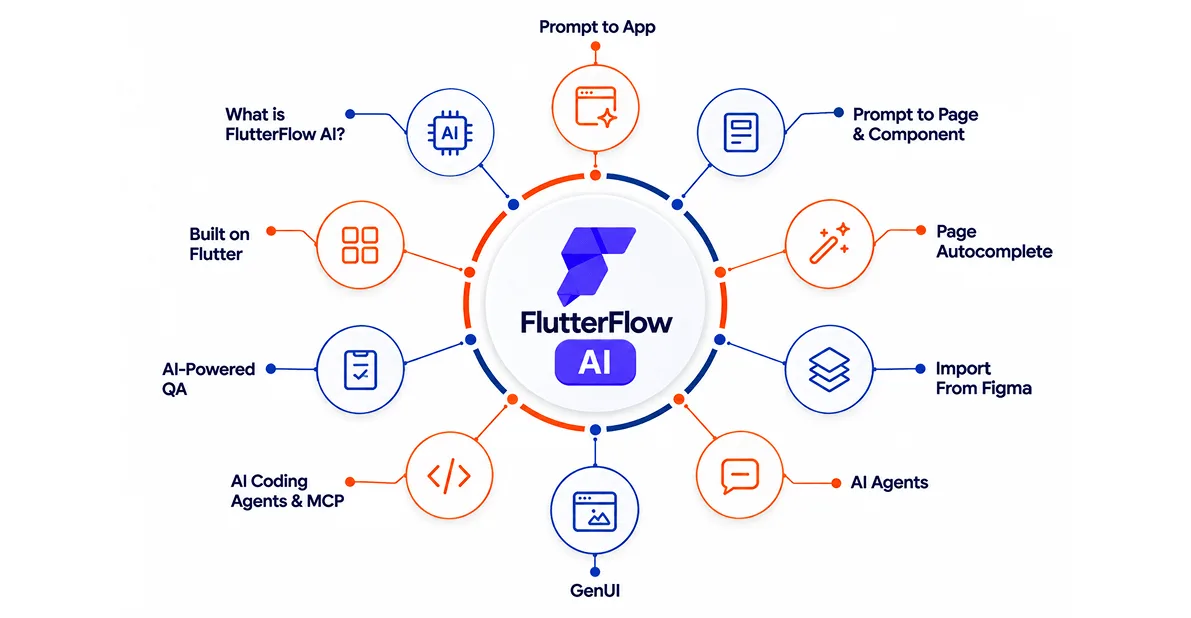
FlutterFlow AI is not just one AI feature. It includes several tools that help at different stages of app development. Some help you create an app from scratch, while others speed up design, component creation, and AI feature integration.
Here are some key FlutterFlow AI tools and what each one does:
Prompt to App: Build a Complete App Starting Point
Prompt to App lets you describe your app in natural language and generate a multi-screen storyboard instead of starting with a blank project. You can choose Instant Generation or explore different visual styles first. You can also attach sketches or screenshots for reference.
Once generated, the screens, theme, layout, and components remain editable. This makes it useful for quickly turning an app idea into a clickable starting point for client reviews, investor demos, or MVP planning.
Prompt to Page & Component: Generate Specific UI Elements
Prompt to Page and Prompt to Component use the same AI generation approach, but focus on a single screen or reusable element. You can describe the page purpose, required elements, and its role in the app flow. You can also prompt changes on an existing screen instead of generating it again.
This makes these tools useful when adding a new screen midway through development or creating reusable cards, forms, and lists without building every element manually.
Page Autocomplete: Complete Partly Built Screens
Page Autocomplete is designed for pages that are already partly built. Instead of creating a new screen, it looks at the existing layout and suggests widgets that could complete it.
For example, an e-commerce product page may need reviews, related products, or shipping details. The AI can suggest these additions based on the page context. It sits between full AI generation and manual design, helping developers fill gaps without rebuilding the entire screen.
Import From Figma: Turn Designs Into Editable Pages
FlutterFlow's Figma integration helps teams move designs into development without recreating every element manually. It can import design systems, individual frames, multiple frames, and components into editable FlutterFlow structures.
However, the quality depends heavily on the original Figma setup. Clean Auto Layout is important for responsive results, while SVG elements still need separate handling. It is best viewed as a strong starting point, not a finished implementation. Developers still need to review layouts, components, navigation, and app logic.
AI Agents: Add AI-Powered Experiences to Apps
FlutterFlow's AI Agents let you add AI features directly inside an application. You can create chat, image generation, video generation, text-to-speech, and speech-to-text experiences using providers such as OpenAI, Google, Anthropic, and ElevenLabs.
For example, an app could include an AI recipe assistant, meeting transcription, or image generator. These agents can also connect with app workflows, making AI part of the product experience rather than a separate chatbot.
GenUI: Let AI Create Interactive UI at Runtime
GenUI takes AI-generated experiences a step further. Instead of returning only text, an AI agent can dynamically display real FlutterFlow components such as product cards, lists, forms, or maps based on what the user asks. Developers define the components, actions, and app events the AI can use.
For example, an e-commerce assistant could show relevant products and update the experience as the user's cart changes. This creates more flexible, interactive AI experiences.
AI Coding Agents & MCP: Edit Projects With AI
FlutterFlow now lets coding agents such as Claude Code, Codex, and Gemini CLI work with FlutterFlow projects through MCP, or Model Context Protocol.
Developers can ask an agent to create or modify pages, components, themes, actions, and app logic using natural language. Changes are pushed to the actual FlutterFlow project and can be reviewed visually. This is not a replacement for the visual builder. It is more useful for precise edits, repeatable tasks, and development automation.
AI-Powered QA: Test Apps With Test Pilot
Test Pilot brings AI into app testing. Instead of manually defining every tap and expected result, developers can describe a test in plain English, such as completing a login or checkout flow. An AI agent runs the test in a browser-based environment and provides results, screenshots, and step-by-step playback.
Tests can also use reusable parameters and run across different device sizes and modes. This makes it easier to build and repeat test coverage as the application changes.
| Feature | What it does | Where it helps | Where developers still matter |
|---|---|---|---|
| Prompt to App | Creates a multi-screen app starting point | MVPs and product concepts | Architecture & business logic |
| Prompt to Page & Component | Generates pages and reusable UI | Rapid prototyping & UI creation | UX refinement & component structure |
| Page Autocomplete | Suggests relevant page elements | Completing existing screens | Product decisions & UX |
| Import From Figma | Converts designs into editable FlutterFlow structures | Design-to-development | Responsive layouts & implementation |
| AI Agents | Adds chat, image, video, and voice AI | AI-powered app features | AI setup, guardrails & backend |
| GenUI | Dynamically creates interactive UI with AI | Personalized AI experiences | Component design & data workflows |
| AI Coding Agents & MCP | Lets AI agents modify FlutterFlow projects | Precise edits & automation | Review, planning & technical decisions |
| AI-Powered QA | Tests app flows using natural-language instructions | Faster test coverage | Test strategy & issue resolution |

Have an app idea but not sure where to start?
Let's evaluate your product requirements, technical complexity, and growth plans before you commit to a development approach.
What Can You Build With FlutterFlow AI?
According to our experience at NebulaTech, FlutterFlow AI works best when it is used to speed up specific parts of product development rather than replace the entire development process. Based on how our team evaluates and uses the platform, these are some of the strongest use cases:
AI Chatbots and Assistants
FlutterFlow AI can help build apps with chatbots and virtual assistants for customer support, FAQs, internal help, or guided user journeys. These assistants can connect with AI models and app data, allowing users to ask questions and receive relevant responses within the application.
AI Content Generation Apps
Apps that create text, summaries, product descriptions, ideas, or other content can be built with FlutterFlow AI. Developers can connect AI models to app workflows and create interfaces where users provide inputs, receive generated content, and edit or save the results.
AI Recommendation Apps
FlutterFlow AI can be a good fit for apps that suggest products, content, services, or other options based on user inputs. Developers can combine AI capabilities with app data to create personalized experiences, such as product suggestions, content discovery, or user-specific recommendations.
AI Image / Vision Applications
FlutterFlow can support applications that use AI for image-related workflows, such as analyzing uploaded images or generating images.
The exact capabilities depend on the AI provider and model you connect. For production applications, you'll also need to consider file handling, API costs, latency, content safety, and privacy.
AI-Powered Business Tools
FlutterFlow AI can be useful for internal tools and customer-facing applications that automate repetitive tasks.
Examples include lead qualification, document summarization, support assistants, workflow automation, and information extraction. These applications often combine AI with databases, APIs, authentication, permissions, and business logic.
MVPs and AI Product Prototypes
One of the strongest use cases for FlutterFlow AI is rapid prototyping.
A startup can use AI-assisted generation to create initial screens and flows, test an idea with users, and identify which features deserve further investment before spending heavily on custom development.
The key is to treat the generated application as a starting point. Production requirements may require additional architecture, testing, custom code, and optimization.
The common thread across these use cases is using AI for a specific product function while FlutterFlow handles much of the application around it. When these projects require deeper customization or technical expertise, you can Hire Flutter Developers to extend FlutterFlow beyond its built-in capabilities and turn the AI concept into a production-ready application.
FlutterFlow AI Limitations You Should Know Before Starting
FlutterFlow AI can make app development faster, but faster development does not always mean a better fit for every project. The important question is not just what FlutterFlow AI can build, but where its limits may affect your product. Understanding these areas early can help you avoid costly changes later.
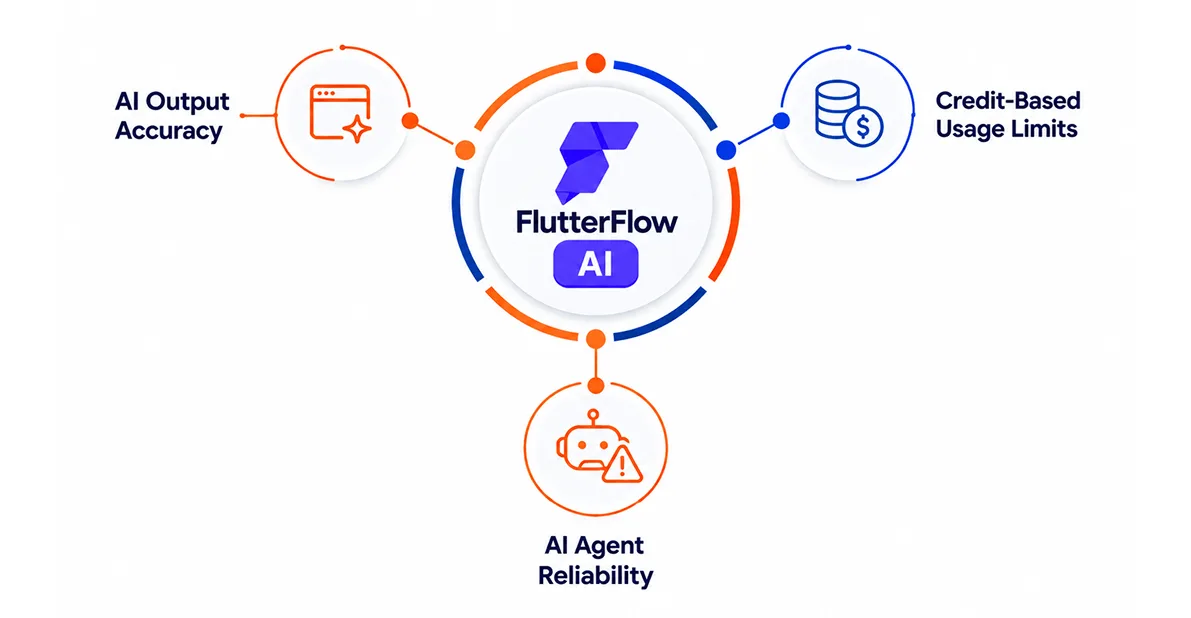
AI Output Accuracy: AI-generated screens, bindings, and logic are a starting point, not a finished product. The AI can misread a prompt's intent, so generated widgets, data connections, and workflows still need a manual review pass before they're ready to ship.
Credit-Based Usage Limits: FlutterFlow AI runs on a credit system, and free and paid plans include different monthly AI credit allowances. Teams that lean heavily on Prompt to App, Prompt to Page, or Prompt to Component may need to move to a higher plan to keep up with usage. (Check FlutterFlow's current pricing page for exact credit numbers; these change over time.)
AI Agent Reliability: Agents built with AI Agent Builder depend on the connected AI model, such as OpenAI, Gemini, or Claude. Response quality and safety aren't guaranteed out of the box, so customer-facing agents still need testing, guardrails, and fallback handling before launch.
Backend Dependency
FlutterFlow AI mainly helps with the app-building side. Your application still needs a well-designed backend for data, authentication, business rules, and other core functions. Simple projects can use supported backend options, while complex requirements may need custom backend development and deeper technical work.
API and Third-Party Service Dependency
Many FlutterFlow applications rely on external APIs and services for payments, AI models, maps, notifications, analytics, and other features. This creates dependencies outside your direct control. Changes to an API, its pricing, usage limits, or service availability can affect your application and may require development changes.
Scalability Considerations
FlutterFlow can work well for many applications, but scalability depends on the complete technical setup. Database design, backend architecture, API calls, and traffic handling all affect how an app performs as usage grows. Large enterprise products with many connected modules may eventually need a more traditional development approach.
Performance Considerations
AI-generated screens give developers a useful starting point, but the generated UI alone does not determine app performance. Consider an eCommerce app with a large product catalog, complex filters, real-time inventory, and multiple API calls. Its performance will depend on query design, pagination, caching, state management, and API architecture. Developers still need to review and optimize these areas to ensure the app remains fast as usage grows.
Security and Data Privacy
For an app handling payments or sensitive customer data, generating the interface is only a small part of the security work. Developers still need to handle authentication, authorization, API protection, secret management, data validation, and secure storage. Logging and third-party service policies also need separate attention. FlutterFlow AI can speed up development, but these security controls still require careful technical planning and review.
Vendor / Platform Dependency
Using FlutterFlow means depending on its platform, features, pricing, integrations, and future product direction. Code export provides an important level of ownership and flexibility, but moving a complex project away from FlutterFlow can still require significant development work. This makes long-term platform dependency worth considering before you start.
Customization Constraints
FlutterFlow offers plenty of customization, but it cannot match the freedom of building every part of an application from code. Deep native features, low-level system controls, advanced hardware integrations, and highly custom business logic may require additional Flutter or native development. In such cases, forcing everything into FlutterFlow can create unnecessary complexity.
Hit a wall with FlutterFlow AI's limits?
From backend architecture to custom Flutter code, NebulaTech picks up exactly where FlutterFlow AI leaves off.
FlutterFlow AI vs Custom Flutter Development: Which Should You Choose?
A faster start is not always the better long-term choice. FlutterFlow AI can help you move from an idea to a working product quickly, while custom Flutter gives developers deeper control over how the application is built and behaves. The key is knowing which trade-off your project can afford.
The comparison below looks at both approaches across development speed, customization, integrations, performance, and technical control.
| Requirement | FlutterFlow AI | Custom Flutter Development |
|---|---|---|
| MVP / Prototype | Excellent | Good |
| Standard CRUD Apps | Excellent | Excellent |
| Rapid UI Generation | Excellent | Moderate |
| Complex Business Logic | Moderate | Excellent |
| Advanced Native Functionality | Limited | Excellent |
| Highly Customized UX | Moderate–High | Excellent |
| Complex Integrations | Moderate | Excellent |
| Performance-Critical Apps | Depends on architecture | Stronger control |
| Enterprise Applications | Depends on requirements | Stronger control |
| Long-Term Customization | Depends on platform limits | Excellent |
| Development Speed | Faster initially | Slower initially |
| Technical Control | Moderate | Very High |
Choose FlutterFlow AI when getting a product built and tested quickly is the priority. Choose custom Flutter when your application needs deeper control, complex logic, advanced native features, or extensive customization. For some projects, combining both approaches can offer a practical middle ground.
How NebulaTech Approaches FlutterFlow AI Projects
At NebulaTech, we use FlutterFlow AI selectively to speed up specific parts of app development. We focus on where it saves meaningful effort while keeping technical control over the final product.
This helps our team use FlutterFlow AI for speed where it makes sense, while keeping developers in control of quality and technical decisions.
Faster prototyping
Use Prompt to App and Prompt to Page to create initial app flows and screens quickly.
AI feature integration
Build chatbots, recommendations, and content-generation features using suitable AI models and APIs.
Design Implementation
Use AI-assisted Figma imports to reduce manual UI recreation.
Custom Development
Add Flutter or native code when a feature needs capabilities beyond FlutterFlow.
Technical Validation
Review generated output for performance, security, scalability, and production readiness
If you already have a React Native or native app and are weighing a move to Flutter, our team can also help you evaluate that transition, or Hire Flutter Developers to take a FlutterFlow AI prototype the rest of the way to a production-ready application.
Conclusion
FlutterFlow AI now covers much more than basic screen generation. From Prompt to App and Prompt to Page to Import from Figma and AI Agent Builder, its tools can support different stages of building your app, and adding AI features to it when you need them.
But the platform works best when you know where its strengths end. Backend complexity, third-party APIs, performance, security, and advanced customization still require careful technical decisions. Our experience also shows that AI-generated work needs developer review before it becomes production-ready.
That's where NebulaTech brings value. We help businesses evaluate the right mobile architecture, choose the appropriate technology, and build scalable cross-platform applications with long-term maintainability in mind. If you're exploring Hybrid Mobile App Development, our team can help you assess product fit, architecture, performance, and development requirements before you commit to a technology path.
FAQs on FlutterFlow AI
FlutterFlow AI is a set of AI-powered tools built into FlutterFlow that helps create app screens, components, and AI-driven features from natural language prompts. It reduces repetitive development work and helps teams move from an idea to a working app faster.